Select a monitoring target from the “Machine List” on the left. The upper center shows the Mac mini's monitoring status, OS, and CPU type. The upper area also shows local measurements and viewer usage.
See your Mac's status,
whenever you need it.
Rabbit Monitor monitors the status of your system and AI apps. With a VPN connection, you can check your machine's status from anywhere.
View download information
Free macOS distribution
Download on the App Store
iOS app now available on the App Store
Preview
Rabbit Monitor
This MacCollecting status
Host
Mac statusView live metrics
AI appsView activity
With a VPN connection, check your machine's status from anywhere.
Check your Mac's status,
on one screen.
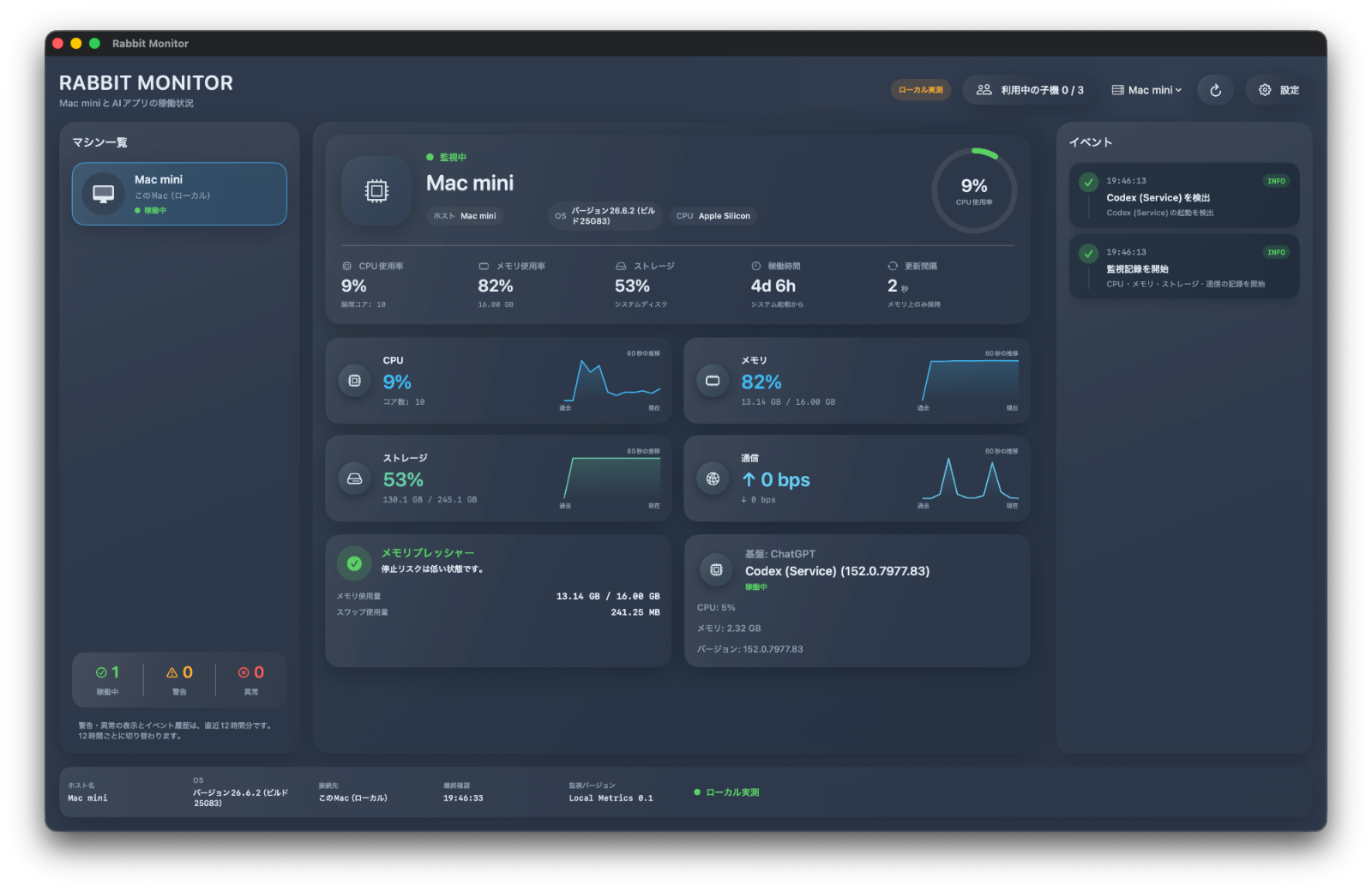
Use the center panels to check CPU usage, memory usage, storage usage, uptime, and update interval.
The CPU, memory, storage, and network panels show trends from the last 60 seconds. You can see not only current values but also changes over time.
Check memory pressure, memory usage, swap usage, and AI app activity.
The Events panel lists records such as AI app detection and the start of monitoring, with timestamps.
Monitor one Mac.
View its status from any device.
Rabbit Monitor has two roles: Host and Viewer. The host Mac collects system and AI app status. A Mac can also be a viewer, while iPhone and iPad connect as viewers. Viewer apps for iPhone and iPad are available on the App Store.

Host
Collects this Mac's live metrics and shares them with viewers.
Check VPN connection

Viewer
Displays the host's status in read-only mode.
A VPN connection is required
Rabbit Monitor checks the status between a host and viewer connected over a VPN. The encrypted VPN connection lets you use it without exposing the host directly to the internet.
Tailscale is recommended for the VPN. This section explains how to connect using Tailscale.
- Install Tailscale on both the host and viewer, then turn on the connection.
- In Tailscale's device list, confirm that both the host and viewer are shown.
- On the viewer, copy the host's Tailscale IP address and paste it into Rabbit Monitor's connection field. Add a half-width colon (
:) and port48620to the end of the IP address. Example:100.x.x.x:48620 - Click the
Connectbutton.
If connection fails Check that Tailscale is connected and that the host is running. If the connection still fails, make sure the host's firewall or other security settings are not blocking traffic to port 48620.
Check the status you need,
without guesswork.
See the information you need in one app.
Mac status
Check the host's system status and notice changes from its normal state.
AI app activity
Check the status of AI apps running on the host from a viewer device.
Events and history
Keep track of status changes with an easy-to-scan event history.
How to monitor
your own devices.
No central monitoring serverConnect the host and viewer over a VPN to check device status.
Viewer devices are read-onlyA viewer cannot control the host. Its role is limited to checking status.
Download here.
Apple notarization complete
Distribution version (Updated October 3, 2026)
1.1 (2)
System requirements
Apple silicon Mac running macOS 15.6 or later.
Important: A Mac host is required
Rabbit Monitor for iPhone and iPad cannot be used on its own.
To use the iPhone or iPad app, install and launch Rabbit Monitor for macOS (the host app) on the Mac you want to monitor. Connect the host and viewer to the same VPN. Tailscale is recommended.
The macOS host app is available to download for free from this page.
Rabbit Monitor does not use a central monitoring server. Viewer devices cannot display monitoring information if the host is not running, the VPN is disconnected, or there is a problem with the host's settings or network.
Important notes and disclaimer
- The displayed information reflects the state when it was collected by the host. Delays, collection failures, shutdowns, and other issues may cause it to differ from the actual state.
- This app is for checking your Mac's status. It does not guarantee continuous operation, prevention of failures, data preservation, or recovery.
- A viewer cannot control or repair the host.
- Rabbit Monitor's operation is not guaranteed if VPN, macOS, Tailscale, other external software, or the network environment has problems.
- Users are responsible for managing host settings, VPN connections, firewalls, backups, and related matters.
- Do not rely on this app alone for emergency monitoring, safety, medical, financial, or other important decisions.
- To the extent permitted by law, the developer is not liable for damages resulting from inaccurate or delayed information, communication failures, app interruptions, or similar issues.
Download for macOS
Unzip the downloaded ZIP file to use it.
Download on the App Store
iOS app now available on the App Store